-1.png?width=200&height=51&name=LM_NuBlu_Horiz_Hi%20(1)-1.png)
Aggregated data for a holistic view for Mission Control
Operator
This role has limited access to the administrative panel (Mission Control) and can use the app to create and manage their own reservations.
Fleet Manager
The Fleet Manager oversees the company's vehicle fleet, including its locations and individual vehicles. They are responsible for strategically assigning vehicles to different services. Their role does not involve managing drivers or handling reservations.
Service Manager
The Service Manager is responsible for the day-today operations of the fleet. They work directly with users and their responsibilities go far beyond just maintenance. Their main activities include creating and managing user groups and services, assigning vehicles, and establishing business and pricing rules.
Operations Lead
Oversees the entire fleet operation. This role has broad permissions to manage day-to-day activities, monitor performance through reports, and supervise other managers, but cannot change core system-level settings.
Administrator
The highest-level role with complete, unrestricted access. This user can configure system-wide settings, manage all data, and access every feature across the platform.
Access and Limitations By Role
Operator
| Category | Explanation | Limitations | |
|---|---|---|---|
| 1 | Reservation Management | This role have complete control over the entire reservation lifecycle. They can check availability, create new reservations, and make any necessary changes, such as updating times. | ✅ Full |
| 2 | User & Access Management | This role have complete control over this permissions, can manage both individual users and users groups. They are able to view Users/User Groups details and invite new members, while also having the ability to check an individual user's status and update their information. | ✅ Full |
| 3 | Vehicle & Fleet Management | This set of features is not available for this role | ❌ No |
| 4 | Financial & Billing Management | This set of features is not available for this role | ❌ No |
| 5 | Organization & System Configuration | This set of features is not available for this role | ❌ No |
| 6 | Reporting & Analytics | This set of features is not available for this role | ❌ No |
| 7 | Location Permissions | The operator is not allowed to use this feature. | ❌ No |
Fleet Manager
| Category | Explanation | Limitations | |
|---|---|---|---|
| 1 | Reservation Management | Fleet Managers have complete control over the entire reservation lifecycle. They can check availability, create new bookings, and make any necessary changes, such as updating times or vehicle assignments. This role also has the authority to start, end, cancel reservations, and even bypass standard booking rules when required. | ✅ Full |
| 2 | User & Access Management | This role are able to view user group details, while also having the ability to check an individual user's status. | ⚠️ View Only |
| 3 | Vehicle & Fleet Management |
This role can oversee all aspects of vehicle operations. They have full visiblity into vehicle groups, livye telemetry, and all associated reservations. This role is also empowered to take direct action by updating a vehicle's status, managing its group assignments, and executing remote commands. |
✅ Full |
| 4 | Financial & Billing Management |
This role can see the initial stages of the biling process. The Fleet Manager can generate and issue new invoices, while having view-only access to the complete history of both invoices and payments. They can also reference the company's business hours to support these tasks. |
⚠️ View Only |
| 5 | Organization & System Configuration | This set of features is not available for this role | ❌ No |
| 6 | Reporting & Analytics | This set of features is not available for this role | ❌ No |
| 7 | Location Permissions | This set of features is not available for this role | ❌ No |
Service Manager
| Category | Explanation | Limitations | |
|---|---|---|---|
| 1 | Reservation Management | This role have complete control over the entire reser vation lifecycle. They can check avalability, reate new bookings, and make any necessary changes, such as updating timnes or vehicle assignments. This role also has the authority to start, end, cance| reservations, and even bypass standard booking rules when required. | ✅ Full |
| 2 | User & Access Management | The roles with these permissions can manage both individual users and larger groups:. They are able to view user group details and invite new members, while also having the ability to check an individual user's status and update their information. | ✅ Full |
| 3 | Vehicle & Fleet Management | This Role can oversee all aspects of vehicle operations. They have full visibility into vehicle groups, live telemetry, and all associated reservations. This role is also empowered to take direct action by updating a vehicle's status, managing its group assignments, and executing remote commands. | ✅ Full |
| 4 | Financial & Billing Management | This role has full control over the entire invoicing process. They can create new invoices and manage all the details within them, including the ability to add, update, or delete individual line items. To ensure accuracy, they also have access to view the company's established business hour rules. | ✅ Full |
| 5 | Organization & System Configuration | This set of features is not available for this role | ❌ No |
| 6 | Reporting & Analytics | This set of features is not available for this role | ❌ No |
| 7 | Location Permissions | This set of features is not available for this role | ❌ No |
Operations Lead
| Category | Explanation | Limitations | |
|---|---|---|---|
| 1 | Reservation Management |
This role have complete control over the entire reservation lifecycle. They can check availability, create new bookings, and make any necessary changes, such as updating timnes or vehicle assignments. This role also has the authority to start, end, ancel reservations, and even bypass standard booking rules when required. |
✅ Full |
| 2 | User & Access Management |
The roles with these permissions can manage both individual users and larger groups. They are able to view user group details and invite new members, while also having the ability to heck an individual user's status and update their information. |
✅ Full |
| 3 | Vehicle & Fleet Management |
This Role can oversee all aspects of vehicle operations. They have full visibility into vehicle groups, live telemetry, and all associated reservations. This role is also empowered to take direct action by updating a vehicle's status, managing its group assignments, and executing remote commands. |
✅ Full |
| 4 | Financial & Billing Management |
This role has full control over the entire invoicing process. They can create new invoices and manage all the details within them, including the ability to add, update, or delete individual line items. To ensure accuracy, they also have access to view the company's established business hour rules. |
✅ Full |
| 5 | Organization & System Configuration |
This set of features is not available for this role |
❌ No |
| 6 | Reporting & Analytics | This role is responsible for architecting the organization's reporting capabilities. The Ops Lead has full authority to create, modify, and delete all report templates, shaping how data is presented. They can also run these templates at any time to generate specific reports and analyze operational data. | ✅ Full |
| 7 | Location Permissions |
This set of features is not available for this role |
❌ No |
Administrator
| Category | Explanation | Limitations | |
|---|---|---|---|
| 1 | Reservation Management | This role have complete control over the entire reservation lifecycle. They can check availability, create new bookings, and make any necessary changes, such as updating timnes or vehicle assigniments. This role also has the authority to start, end, cancel reservations, and even bypass standard booking rules when required. | ✅ Full |
| 2 | User & Access Management | The roles with these permissions can manage both individual users and larger groups. They are able to view user group details and invite new members, while also having the ability to heck an individual user's status and update their information. | ✅ Full |
| 3 | Vehicle & Fleet Management | This Role can oversee all aspects of vehicle operations. They have full visibility into vehicle groups, live telemetry, and all associated reservations. This role is also empowered to take direct action by updating a vehicle's status, managing its group assignments, and executing remote commands. | ✅ Full |
| 4 | Financial & Billing Management | This role has full control over the entire invoicing process. They can create new invoices and manage all the details within them, including the ability to add, update, or delete individual line items. To ensure accuracy, they also have access to view the company's established business hour rules. | ✅ Full |
| 5 | Organization & System Configuration | This role has significant administrative authority, including the ability to manage top-level organization settings. They are responsible for structuring system data by managing tags and tag types, and also handle practical operational tasks like assigning NFC access cards to devices. | ✅ Full |
| 6 | Reporting & Analytics | This role is responsible for architecting the organization's reporting capabilities. The Administrator has full authority to create, modify, and delete all report templates, shaping how data is presented. They can also run these templates at any time to generate specific reports and analyze operational data. | ✅ Full |
| 7 | Location Permissions | This role has the highest level of authority, managing the entire organization and its core settings. This role can view the precise, real-time coordinates of any vehicle during a reservation, which is crucial for monitoring. | ✅ Full |
Mission Control User Roles Overview
| Category | Operator (Technician) | Fleet Manager | Service Manager | Ops Lead | Administrator | |
|---|---|---|---|---|---|---|
| 1 | Reservation Management | ✅ Full | ✅ Full | ✅ Full | ✅ Full | ✅ Full |
| 2 | User & Access Management | ✅ Full | ⚠️ View Only | ✅ Full | ✅Full | ✅ Full |
| 3 | Vehicle & Fleet Management | ❌ No | ✅ Full | ✅ Full | ✅Full | ✅ Full |
| 4 | Financial & Billing | ❌ No | ⚠️ View Only | ✅ Full | ✅Full | ✅ Full |
| 5 | Org & System Config | ❌ No | ❌ No | ❌ No | ❌ No | ✅ Full |
| 6 | Content & Support | ❌ No | ❌ No | ❌ No | ✅Full | ✅ Full |
| 7 | Reporting & Analytics | ❌ No | ❌ No | ❌ No | ✅Full | ✅ Full |
| 8 | Location Permissions | ❌ No | ❌ No | ❌ No | ❌ No | ✅ Full |
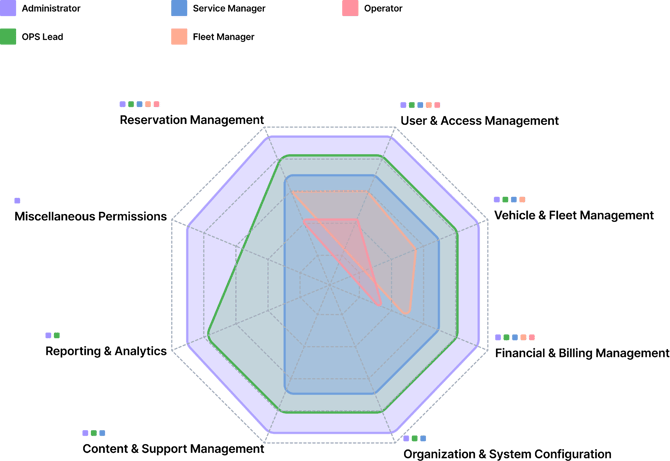
Mission Control User Roles Visual
Breakdown
How to Read This Graph:
The Axes: Each axis extending from the center represents one of our permission categories (e.g., Reservation Management, Financial Management, etc.).
The Lines: Each colored line represents a specific user role (Admin,Ops Lead, Fleet Manager, etc.).
The Scope of Access: The fur ther a point is from the center along an axis, the greater the level of permission that role has within that category. A role with a larger overall shape has broader access across the entire system
Mobile Application and Web
Reservation App Roles
Operator
This role is perfect for team members who need to stay informed. It provides access to create reservations and see vehicles details. The Operator role does not have access to the Web Reservation App
Driver
This role grants unrestricted access across the entire app and WRA. A user with this role can manage all users and permissions, create and modify any reservation, access to see all vehicle and financial data. This is the highest permission level.
Managed Driver
This role has full administrative access to manage users, payments, and view data like telemetry and documents. Reservation access is limited to cancel or modify, without the ability to create new ones.
Access And limitations By Role
Operator
| Category | Explanation | Limitations | |
|---|---|---|---|
| 1 | User & Account Management | This role has complete administrative control over the account. They are fully authorized to manage section, from updating their profile information and validate phone number. | ✅ Full |
| 2 | Payments | This set of features is not available for this role | ❌ No |
| 3 | Reservations | This role has full and unrestricted access to the reservation system. This covers all actions, including and modifying reservations | ✅ Full |
| 4 | Vehicles & Telemetry | This role gives user complete access over telemetry. Can also monitoring live telemetry and handling authentications, in addition to being able to report damage and have access to the vehicle. | ✅ Full |
| 5 | Documents & Forms | This set of features is not available for this role | ❌ No |
Managed Driver
| Category | Explanation | Limitations | |
|---|---|---|---|
| 1 | User & Account Management |
This role has complete administrative ontrolover the account. They are fully authorized to manage the entire account section, from updating their profile information and validate phone number and other features. |
✅ Full |
| 2 | Payments |
This role allows the user to manage their personal billing information. They can view their invoices in the reservation details, as well as add, update, and select which payment method to use for a charge. Users can also delete a payment method, provided they have more than two registered. This applies if the organization has the Payments module enabled. |
✅ Full |
| 3 | Reservations |
The Driver business has limited access to the reservation system. This covers actions to modify or cancel reservations, but they cannot create them. |
⚠️ View Only |
| 4 | Vehicles & Telemetry |
This role gives user complete access over telemetry. Can also monitoring live telemetry and handling device authentications, in addition to being able to report damage and have access to the vehicle. |
✅ Full |
| 5 | Documents & Forms |
This role has complete access to the user and reservation documents. They are empowered to manage the entire document lifecycle, which includes creating, reading, updating, and deleting any document. Also shows documents associated with the current reservation and vehicle. |
✅ Full |
Driver
| Category | Explanation | Limitations | |
|---|---|---|---|
| 1 | User & Account Management |
This role has complete administrative control over the account. They are fully authorized to manage the entire account section, from updating their profile information and validate phone number and other features. |
✅ Full |
| 2 | Payments |
This role allows the user to manage their personal biling information. They can view their invoices in the reservation details, as well as add, update, and select which payment method to use for a charge. Users can also delete a payment method, provided they have more than two registered. This applies if the organization has the Payments module enabled. |
✅ Full |
| 3 | Reservations |
This role has full and unrestricted access to the reservation system. This covers all actions, including creating, canceling, and modifying reservations. |
✅ Full |
| 4 | Vehicles & Telemetry |
This role gives user complete access over telemetry. Can also monitoring live telemetry and handling device authentications, in addition to being able to report damage and have access to the vehicle. |
✅ Full |
| 5 | Documents & Forms |
This role has complete access to the user and reservation documents. They are empowered to manage the entire document lifecycle, which includes creating, reading, updating, and deleting any document. AIlso shows documents associated with the current reservation and vehicle. |
✅ Full |
App/WRA User Roles Overview
| Category | Base Driver (Operator) | Managed Driver | Driver | |
|---|---|---|---|---|
| 1 | User & Account Management | ✅ Full | ✅ Full | ✅ Full |
| 2 | Payments | ❌ No | ✅ Full | ✅ Full |
| 3 | Reservations | ✅ Full | ⚠️ View Only | ✅ Full |
| 4 | Vehicles & Telemetry | ✅ Full | ✅ Full | ✅ Full |
| 5 | Documents & Forms | ❌ No | ✅ Full | ✅ Full |
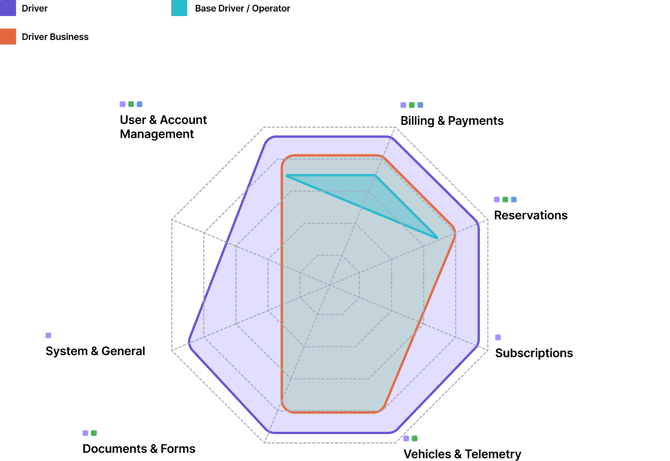
APP/WRA User Roles Visual Breakdown
How to Read This Graph:
The Axes: Each axis extending from the center represents one of our permission categories (e.g., Reservation Management, Financial Management, etc.).
The Lines: Each colored line represents a specific user role (Admin,Ops Lead, Fleet Manager, etc.).
The Scope of Access: The fur ther a point is from the center along an axis, the greater the level of permission that role has within that category. A role with a larger overall shape has broader access across the entire system