-1.png?width=200&height=51&name=LM_NuBlu_Horiz_Hi%20(1)-1.png)
The Flexible Rounding Logic feature in Mission Control allows Administrators users to configure how reservation durations are rounded when calculating charges.
With this enhancement, the business can now apply specific rounding methods—such as Round Up or Round Down for each SKU within a pricing ruleset. This provides full control over how billing aligns with your business model and eliminates the need for manual adjustments.
Why This Matters
Previously, all charges were prorated based on the reservation’s exact duration. While this worked for hourly or flexible pricing, it created challenges for clients who charge per full day, week, or month.Now, you can define custom rounding rules that reflect the business true pricing strategy ensuring consistency, accuracy, and transparency in every invoice.
How to Create a Pricing Ruleset with Rounding Logic
Step 1: Navigate to Mission Control
-
Log into Mission Control.
-
Go to Pricing → Pricing Rulesets.
Step 2: Create or Edit a Pricing Ruleset
-
Click Create New Ruleset, or
-
Select an existing ruleset and click Edit.
Step 3: Configure the Rounding Method
In the Pricing Calculation Settings section, the Administrator now see a “Rounding Method” dropdown.
Select from the available options:
-
No Rounding (Prorated): Calculates charges proportionally based on actual duration. (Default setting)
-
Round Up (Ceiling-based): Rounds duration up to the nearest full unit (e.g., 25 hours → 2 days).
-
Round Down (Floor-based): Rounds duration down to the nearest full unit (e.g., 25 hours → 1 day).
The Administrators can apply different rounding methods per SKU (e.g., Rental Fee vs. Licensing Recovery Fee).
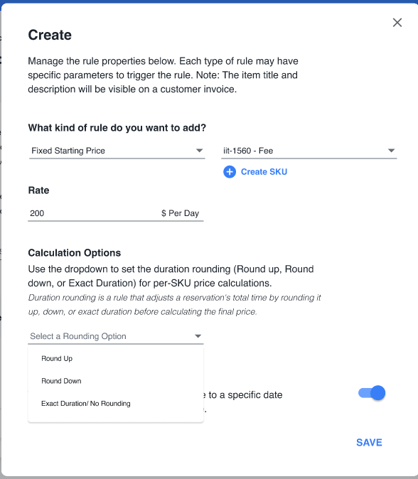
Example:
-
Rental Fee: Round Up (Charge full days)
-
Licensing Recovery Fee: Round Down (Charge completed days only)
To review a step by step guide go to the following link:
- Create a Pricing Ruleset - https://knowledgebase.launchmobility.com/create-a-pricing-ruleset
How It Works in Calculations
When a reservation is processed, the system will automatically:
-
Apply the defined rounding rule for each SKU.
-
Calculate the total price per SKU as:
-
Round Up:
ceil(duration ÷ unit) × unit_price -
Round Down:
floor(duration ÷ unit) × unit_price
-
-
Sum all SKUs for the final reservation total.
-
Display the applied calculation method in the invoice and pricing breakdown.
Reporting & Transparency
the Business can now view the calculation method used (Prorated, Round Up, or Round Down) in your billing reports.
This helps Admins audit pricing outcomes and ensure each reservation follows the intended billing logic.
Data Migration
All existing organizations with the Invoicing/Billing module enabled will automatically gain access to the new rounding configuration.
Existing pricing rulesets will default to No Rounding (Prorated) to preserve current billing behavior.
Notes & Limitations
-
The feature is available only to organizations with Invoicing/Billing enabled.
-
Partial-day or partial-period reservations follow the rounding rule the Business set: Make sure this aligns with the pricing strategy.
-
This release does not include “round to nearest decimal”.
Best Practices
-
Use Round Up for fixed-fee or full-day rentals to maximize revenue consistency.
-
Use Round Down for recovery fees or ancillary charges that should only reflect completed days.
-
Always review the invoice preview to confirm rounding behavior before publishing rulesets.
Related Article
- Create a Pricing Ruleset - https://knowledgebase.launchmobility.com/create-a-pricing-ruleset